
Free Fire ID Ban Check or not – Check UID Ban Status
Want to know if a Free Fire account is banned? Paste the UID, hit check, and you’ll see the current status in a few seconds. You’ll also get whatever player details the lookup returns.
No password. No login. Just the UID.
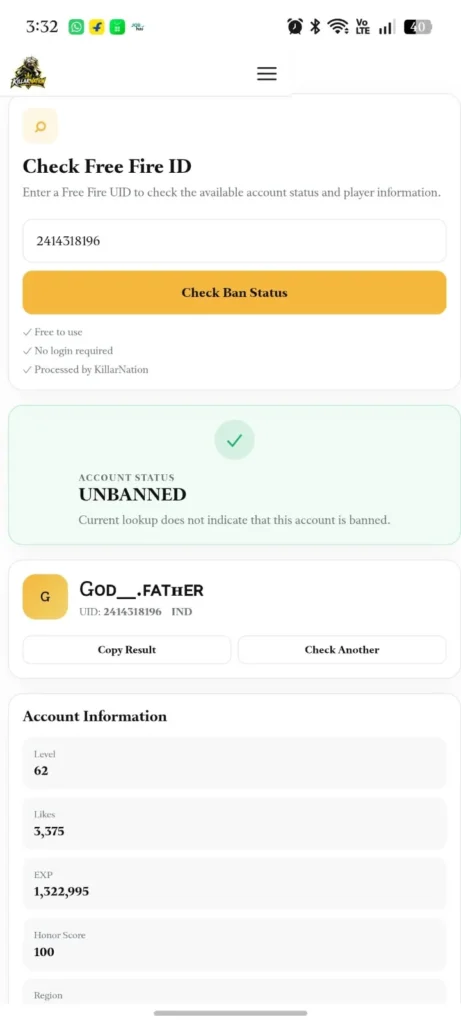
What Is a Free Fire ID Ban Checker?
It’s a simple UID lookup. You give it a player’s numeric ID, and it tells you whether that account looks banned or not, based on the status the lookup service sends back.
That’s all it needs. Never type your Free Fire password, Facebook or Google login, OTP, or recovery details into any checker. This one doesn’t ask for them, and a tool that does is a massive red flag.
If the data is available, you’ll also see the player’s nickname, level, region, likes, rank, account creation info, last login, and a few other profile bits. Some fields can come back empty, and that’s entirely normal.
How to Check a Free Fire Ban Status
It takes under a minute:
- Open Free Fire and tap the player’s profile.
- Copy the numeric UID.
- Paste it into the checker above.
- Hit Check Ban Status.
- Read the status result and the player details underneath.
Use the UID, not the nickname. Nicknames can be changed or shared, but the UID is the one unique identifier that points to a single, specific account.
Try These Search Examples
Want to test the tool? Try these famous Free Fire creator UIDs:
If you want to see how the player data, level, and regional profile layout renders when a lookup is successful, copy and paste one of these real, active creator UIDs into the input field above:
- Raistar (India): 12022250 — Famous Indian “One-Tap King” profile.
- Ankush FF (India): 241375963 — OG mechanical gameplay legend.
- Badge 99 (India): 317768081 — Highly popular Indian content creator profile.
Would you like me to refine the FAQ section next, or do you need help generating meta descriptions and SEO tags optimized for these exact keywords?
What the Checker Shows
What you see depends on what the lookup service returns at that exact moment. Here is what can show up on your dashboard:
- Ban Status: The live status returned by the database lookup.
- Player Name: The player’s active Free Fire nickname.
- UID: The unique account ID number you searched.
- Level and Experience: How far the account has progressed.
- Region: The specific global server the player belongs to.
- Likes: The total profile likes accumulated by the player.
- BR Rank and BR Points: Current Battle Royale standing and rank points.
- Account Created: The date the account was first registered (if available).
- Last Login: Recent in-game activity timestamps (if available).
- Guild: The player’s current guild name and ID (if they are in one).
What Each Status Result Means
🟢 Unbanned. The lookup doesn’t show any ban on this account right now. “Right now” matters here. It says nothing about whether an account stays clean tomorrow if a player decides to break rules later.
🔴 Banned. The account appears banned, suspended, or restricted. If it’s yours, immediately head to Garena’s official support channels. Completely skip the third-party “unban services” you see advertised online—they cannot access game servers.
⚪ Player Not Found. The lookup couldn’t match that UID to an active player profile. Most of the time this is caused by a simple typo or a bad copy-paste. Double-check the numbers and try again.
🟠 Unable to Verify. The service was temporarily down, sent back a broken response, or failed to communicate with the data node. Do not read this as “safe.” It only means the checker couldn’t reliably pull the current status.
Why Do Free Fire Accounts Get Banned?
Garena’s security system actively penalizes profiles for several direct violations. According to official guidelines, these include using modified or unauthorized game clients, running malicious third-party tools alongside the game, editing native game files, abusing severe glitches or bugs, and attempting to bypass anti-hack detection.
Garena enforces a zero-tolerance policy, and accounts caught cheating can be suspended permanently. If you are thinking about taking a shortcut “just this once,” it is truly not worth losing your entire account history.
For the complete list of forbidden activities, read Garena’s Official Abuse Policy & Fair Play Guide.
Can a Free Fire ID Be Unbanned?
Not by using a tool like this, no. A UID lookup only identifies and reads public data; it holds no administrative power over game databases. Entering a UID into an unofficial website will never lift a restriction.
If your account has been restricted and you believe it was a mistake, your only legitimate course of action is to file a formal appeal through the Garena Free Fire Help Center. Watch out for anyone on social media promising instant unbans for money, passwords, or verification codes. Those are malicious scams designed to steal valuable items or hijack working accounts.
Do I Need to Enter My Password?
Absolutely not. The checker works strictly using the public numeric UID.
If any website ever asks for your password, Facebook/Google login, or a verification OTP to “check a ban status,” close the tab immediately.
Who Made This Tool?
Built and maintained by the Killarnation team, an independent fan community of veteran players dedicated to delivering authentic, data-driven resources for the Free Fire community. We specialize in breaking down complex game mechanics, tracking creator profiles, and engineering helpful utilities like our Account Value Calculator and Sensitivity Generator.
We do not host or endorse hacks, cheats, or diamond generators. Our Ban Checker runs entirely on open, public UID data endpoints meaning we never ask for your login details and your personal account data remains 100% secure. Spotted a wrong result or a broken lookup? You can Contact our support team directly here.
Free Fire ID Ban Checker FAQ
Is this tool free to use?
Yes. It is completely free, and you never need to share any personal login details.
How do I check if my Free Fire ID is banned?
Copy your numeric UID from your in-game profile, paste it into the field at the top of this page, and click Check Ban Status. You will see the live status returned by the lookup database.
Can I check an account with only the UID?
Yes. The numeric UID is the only information required to run the lookup.
Does it need my password?
No. Never give your password, email logins, or OTP verification codes to any third-party tool.
What does “Unbanned” mean?
It means the database does not show an active ban on the account at this exact second. Statuses can change at any time based on Garena’s enforcement actions.
What does “Banned” mean?
The account is currently listed as banned or restricted according to the real-time lookup data.
Why does my UID say “Player Not Found”?
You may have accidentally mistyped a digit, copied an invalid format, or the lookup service is experiencing a brief connection delay. Recheck the exact number and try again in a few minutes.
Can I unban my ID using this checker?
No. The UID only reads data; it cannot modify account status. Only official Garena support agents can review and lift an account restriction.
Does it work with Free Fire MAX?
Yes. Because Free Fire and Free Fire MAX share the exact same user database, the checker works identically for both versions using your account UID.
How often can a ban status change?
Anytime. Garena bans accounts in waves and real-time sweeps, so the status you see is a live snapshot of the exact moment you clicked the button.
What if the checker can’t verify my account?
Double-check your UID, wait a few moments, and hit check again. A temporary verification failure or API timeout does not mean your account is unbanned.
{Want the full details? Garena covers its fair-play rules on the official Free Fire website, and it’s worth a quick read before you try any third-party tool.}